Showing posts with label CPU. Show all posts

Sunday, 14 August 2016

OPERATING SYSTEM TECHNIQUES


Introduction

One of the primary task of operating system is to manage the internal resources (hardware) in such a way so that it should achieve the performance (service). It can also be understood by that OS has to coordinate the data processing with the required hardware in order to get the job done and distribute the output in the most effective and efficient way.

The most important resources in the computer is processor which is the brain of the machine and transform and execute all the activity within the computer system. That means performance of any computer is mostly depends upon the CPU architecture and it is only OS who always keeps the CPU busy by scheduling the various tasks to be processed within the system to provide services to the user  like processing multiple applications at the same time, running OS simultaneously and monitoring various hardware activities.

In the era of technological advancement, the performance of CPU keeps on increasing and new values has been added to give ultimate performance to diverse customer groups.

It is very important to understand that any technological addition in the CPU, increases its scope of performance, but we need to also see, operating system has to be updated about the new architecture otherwise OS would not be able to extract the maximum performance out the CPU. There are different types of CPU is available like dual core, quad core with multi thread technologies which has two complete execution cores per physical processor, which can process multiple data at the same time thus increases the output performance.


If OS does not recognizes the processors physical capabilities, then OS cannot use them while trying to process the job commanded by the user. Therefore it is important to also equip OS with the required understanding on how to extract the best performance while installed in the diverse types of CPU types and various hardware.

Now lets discuss the Techniques of Operating System:-

Multi Programming:- It is a process of parallel execution of multiple programs / set of instructions in single CPU simultaneously. Using this technique single CPU works on two or more programs at the same time. Multi-programming allows the processor to handle either multiple batch jobs at a time (Batch Multi programming) or multiple interactive jobs shared among multiple users (Time Sharing Multi-programming). 

Time-sharing is a technique that allows a CPU to simultaneously support the activities of several users by allocating fixed time slots (in milliseconds).

Examples of operating systems that support multi-programming are OS/2, UNIX and Mac OS7 +.
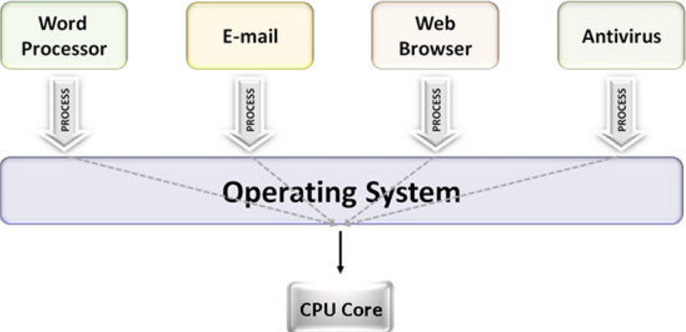

Multi Processing:- Since we have already understood Multi Programming which allows two or more programs to run in a single CPU simultaneously. Multi Processing can be easily understood by the induction of multiple cores in the CPU, means multi processing capability, therefore, Multiprocessing refers to the use of two or more CPUs to perform a coordinated task simultaneously within a single computer system.


Multi Tasking:- When you understand the Multi Programming and Multi Processing, which allows multiple data / programs can be executed simultaneously, then it is obvious that computer can perform multiple task at the same time. It is possible with the CPU capability and OS scheduling power which allows users to run multiple applications simultaneously.


Multitasking refers to the ability of an operating system to execute two or more tasks concurrently.In multitasking environment, the user opens new applications without closing the previous ones and the information can be easily moved among a number of applications. 


Multi Threading:- Multi Thread is process of using CPU resources in such a way that it executes multi threads to run on each core of single CPU. It is the power of CPU to execute multiple threads or processes concurrently, which is supported by the operating system.


As a performance feature, it also increases processor throughput, improving overall performance on threaded software. It helps in running demanding applications simultaneously while maintaining the system responsiveness and keep system protected, efficient, and manageable while minimizing impact on productivity.


See a small video on how it works, please click the below link of Intel.


Follow me on twitter @amrishchoubey


Saturday, 5 September 2015

UNDERSTANDING COMPONENTS OF COMPUTER SYSTEM


COMPONENTS OF COMPUTER SYSTEM

WHAT IS COMPUTER SYSTEM

Computer is an integration of hardware and software which can accept, process and generate output for further use by the user. In simple term, computer is just a simple processing device.

In order to process a input by computer, there are numbers of hardware is required to convert the input in the user readable format because computer only understand binary language that is 0 and 1. Here 0 means low and 1 means High.

Logically, the meaning of computer is "a machine who can calculate/ compute".  Either you use computer to calculate numbers or do computing while browsing internet and using applications to satisfy once need.

Lets discuss the major components which makes the computer as a system:

  1. Motherboard:- Motherboard is like a heart of the computer which enable the communication interface between all connected hardware like CPU, RAM, Mouse, Keyboard, Hard Disk, Printer, Scanner, Camera, VDU etc. It creates an communication interface between input devices with CPU and with Output devices to show results.
  2. Central Processing Unit(CPU):- CPU is like a brain of the computer which interprets the input command and based on the processing desire, it transform the input command into output. Whatever we see / listen on the desktop which includes icons, folders, graphics, pictures, movies / websites / music etc. are being processed by CPU only. When we talk about application software, these are just a set of instructions only written in high level language and we install to use it. Please understand all software are only language which we cannot use without CPU, because when we give a command to use browser to surf Internet, browser is a collection of files of various set of instructions written in High Level Language, which our CPU processes and transform them into user understandable format.CPU has 3 units namely, Control Unit , Logical and Arithmetic Unit. Control unit is like a manager of CPU who control the flow of instructions to be processed and directs them either to logical unit or arithmetic unit on the basis of types of instructions.
  3. Random Access Memory(RAM):- RAM is knowns as primary memory of computer system which is also a temporary memory. Lets understand why RAM is called a primary memory. As I already explained about software that is only a collection of files of various sets of instruction written in High Level Language which CPU processes in user readable format, that how machine interacts with humans. RAM provides a space to computer system where these files of specific software can be loaded, so that CPU can do his action of transforming these numbers of files into user readable format. Even Operating system is also a software who also require space in RAM, for further processing by CPU. Now lets understand why RAM is known as Temporary memory, with the help of above explanation, when a user wants to use computer, he gives wake up command by pressing power button, once it is done, OS gets loaded into RAM and CPU starts processing these OS files and the user see the booting up of OS. Once OS is ready, we may give command to start MS-WORD or any other software, since MS-WORD is an application software combination of various sets of instructions, these files gets loaded into RAM and CPU processes. When we give command to close MS-WORD, all those files which required to be processed by CPU, gets off-loaded from RAM. When we give shut down command, whatever applications are open, will be erased from RAM. That is why we call it a temporary memory which is volatile in nature- reads and write multiple times.
  4. Hard Disk (HDD):- HDD is known as secondary device of computer which is used to store data permanently. Here permanently means, whatever software we install, music/video files we save, that stores in HDD and it will remain there until we wish to delete them. HDD plays a very important role in the performance of a computer system because whatever applications we wish to open , any files we wish to view/ use, system loads these files into RAM from HDD only. If HDD read and write speed is slow, then the files will take time to get loaded in RAM, if files are not loaded fully, CPU will not initiate the process, and ultimately user needs to wait for the output to come. And if read and write speed of HDD is high, you can imagine, read and write of data files will be faster and user will get response immediately. That is how we measure the performance of the computer system. Normally there are two types of HDD available with 5200RPM and 7200RPM. Some of the manufacturers are using SSD (Solid State Drive) whose read/write speed is 3 times faster than the normal HDD.
  5. Read Only Memory (BIOS CHIP):- ROM is permanent memory and once data is stored, it is very difficult to delete it. It is also depends upon which types of ROM you are using in the system. BIOS is knows as Basic Input Output System, this is the ROM chip integrated in the motherboard in which few instructions are stored who checks and confirms the availability of primary hardware and software to start the machine. When we switch on the computer, first command will reach to BIOS chip and whatever instructions are stored will get executed automatically. After confirming the required hardware, it instruct the computer to load the Operating system files from HDD into RAM, that process of loading OS files into RAM is  called booting up. In case of any hardware failure which is required and written as instruction in BIOS chip, BIOS inform the user accordingly, so that corrective actions can be initiated by the user or engineer.
The above are the components which are essential to set up processing environment which has to be complemented by Input devices and Output devices.

Input Devices are used to give user instructions to computer whereas output devices are used to show the processed output by the computer.

Input Device includes, Keyboard ,Mouse, Camera, Mic and Scanner etc whereas LCD, printers and speakers are knows as Output device.